A closer look
at your stars.
Measure the candidates in your monochrome FITS frames. See their half-flux radius, inspect regional samples and carry a useful report.
Planned price $3.99 once · Coming to the App Store
No telescope connection required. Open your existing files in an independent, offline workspace.
Your files. Actual measurements.
Inspect the field
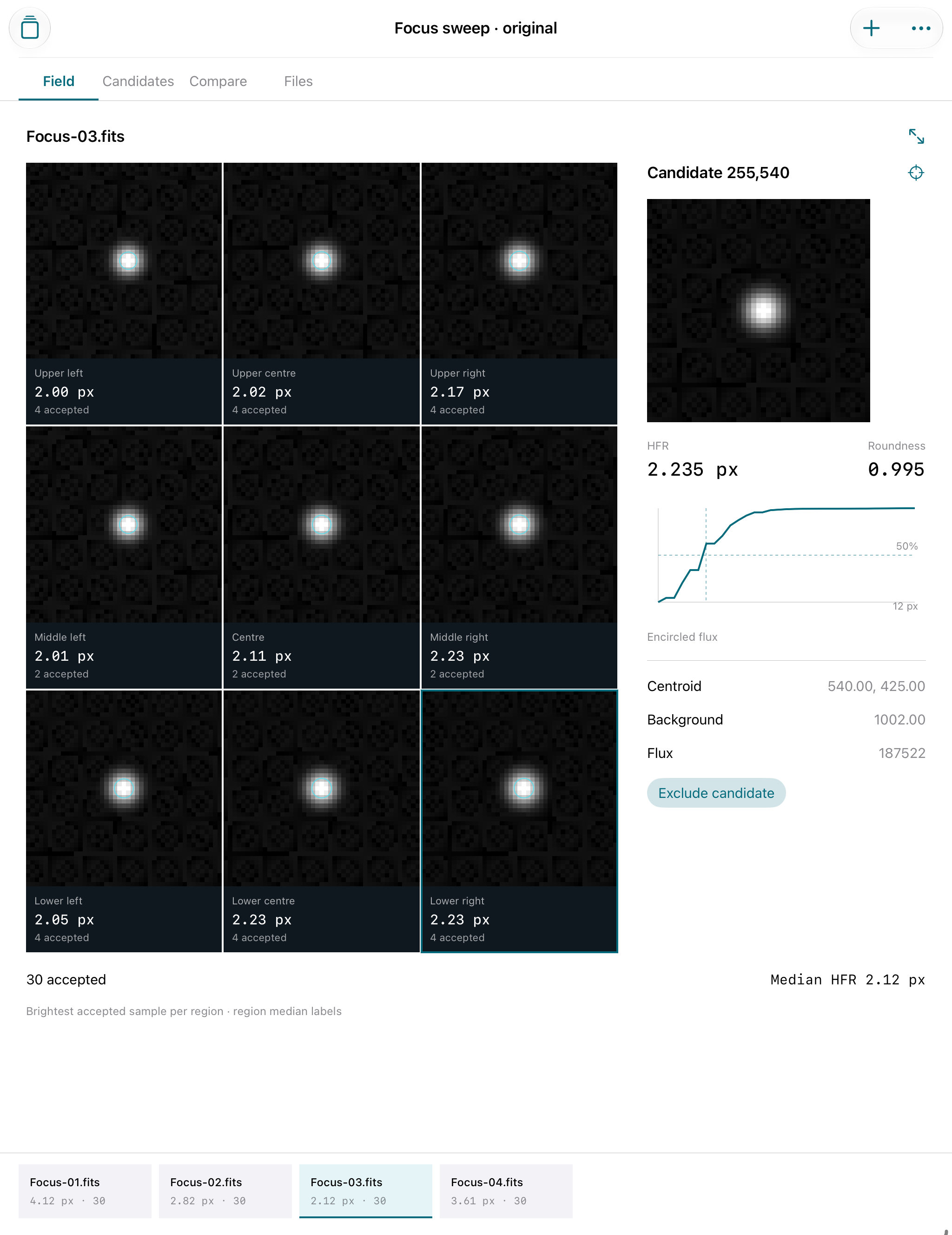
A 3×3 mosaic links bright accepted candidates to regional HFR medians and counts. Open the whole-frame preview or inspect an individual pixel crop.
Compare a focus sweep
Keep eight equal-dimension frames in each of twelve studies. Compare aggregate HFR and moment roundness, adjust detection settings and exclude false detections.
Take the evidence
Export an actual PDF, candidate/frame/region CSV, source hashes, full study JSON and mosaic PNGs in a derived report ZIP.
What the measurements mean
HFR is the radius enclosing half of positive background-subtracted flux inside your chosen aperture. Roundness comes from second moments. These are not Gaussian or Moffat FWHM fits. Candidates are not matched between frames; use the same camera, binning, filter and conditions. Regional differences do not diagnose tilt or backfocus.
Uncompressed, single-primary 2D grayscale FITS only: BITPIX 8, 16, 32, −32 or −64, finite values; up to 4096 pixels per side and 140 MB/file, with 512 MB total stored sources. No cubes, extensions, compressed FITS, BLANK pixels, RGB/JPEG, autofocus, astrometry or camera control. Coordinates are zero-based; the first FITS row appears at the top. No WCS rotation.
Support
Email maga40@naver.com with the app version, iOS version and a description of the problem. Do not send private FITS files unless you choose to share them.
Start a study
Choose New study, then select supported FITS files from Files. Each frame is decoded and measured locally. The optional original focus sweep provides four synthetic files through the same measurement engine. Inspect candidates and exclusions before interpreting a summary.
Save and delete
Sources, settings and manual exclusions remain in the app's local library. Rename a study and add notes from Studies → Edit. Deleting a study deletes its source copies. Deleting the app removes all local studies. Save derived reports to Files; the report ZIP is not an importable backup and does not contain original FITS files.
Too few candidates?
Reduce the detection threshold or inspect the source. Crowded, edge, flat-core, undersampled and aperture-limited candidates are automatically excluded. No accepted candidates is a valid result; it is not evidence of good or bad optical alignment.
Privacy policy
Effective October 3, 2026. Apertide does not collect or transmit personal data to Gobling Company. It has no account, analytics, advertisements or remote processing SDK. Imported files and generated reports are stored on your device.
You initiate import with Apple's Files picker and sharing with the native share sheet. A storage or sharing provider you choose has its own privacy practices. Gobling Company receives only information you voluntarily send to support by email. Local data can be removed by deleting a study or uninstalling the app.
Terms
Apertide is a local inspection and reporting tool. Measurements depend on input values, sample selection, background estimation and aperture settings. It does not certify optics, focus quality or hardware compatibility. Inspect the candidate census and keep your source originals. Purchases and refunds are handled by Apple under its applicable terms. Original app code and artwork © 2026 Gobling Company. Reference products are not affiliated with Apertide.