Hear the shape
of your tuning.
A workbench for ratios, cents and the scale you want to keep. Select a degree, hear its sine tone, then take a matching file package to your next session.
For iPhone and iPad. $4.99 US upfront purchase, local prices vary. No subscription or in-app purchase.
- Edit your own Scala pitches and reference frequency.
- Inspect intervals and equal-division differences.
- Save, reopen and refine up to 30 tunings.
- Export SCL, CSV, PDF and matching WAV in one ZIP.
App Store submission in progress. The image shows the actual app with an original just-intonation tuning, degree 7 selected.
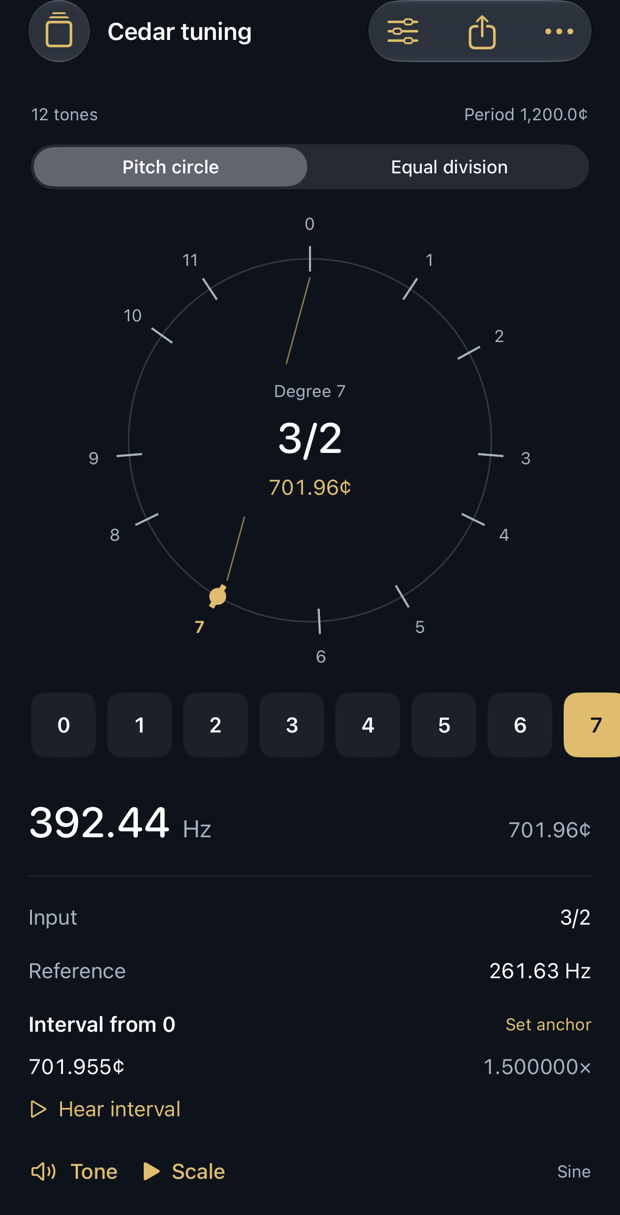
One scale. Matching outputs.
Scala preserves your ratio and cents tokens. CSV and the paginated PDF include every degree, its frequency and deviation from equal divisions of the same period. The 44.1 kHz, 16-bit mono WAV plays the same frequencies in ascending order, with a short attack and release. Share a ZIP with these four files and a README, or share each output separately. Preview the actual PDF in the app.
Designed around the tuning
Use the selectable pitch circle, linked degree list and numeric interval inspector. iPad portrait pairs the degree rail with the workbench; landscape uses three panes and playable degree keys. Start with 12, 19, 24 or 31 equal divisions, just intonation, a non-octave 3/1 study, or your own imported .scl file.
Supported scope
2–72 positive ascending pitches, including the repeating period; tonic is implicit. Periods 20–4,800 cents. Reference 20–1,000 Hz, with period endpoint at most 16,000 Hz. Import UTF-8 or Latin-1 Scala text up to 64 KB. Unordered and non-positive scales are rejected. Integer tokens mean ratios; cents need a decimal point.
Scala is a tuning exchange format, not a keyboard mapping. The receiving software must support SCL; choose mapping and reference there. Cenvale has no KBM, MIDI, MPE, AUv3, external synth control, microphone tuner or performance recording. Audition is foreground only. Reduce device volume before listening. Output is not a calibrated loudness reference.
Support
Email maga40@naver.com with app version and steps. Do not send private tuning files or notes unless you intend to share them.
For import errors, check the declared pitch count, positive ascending order and final repeating period. Lower the reference if an endpoint exceeds 16,000 Hz. Export needs at least 40 MB of free device storage. Use More options to duplicate, favorite or delete a tuning. Delete removes that local tuning and its local exports; shared copies remain in their destinations.
Privacy policy
Effective October 2, 2026. Gobling Company does not collect data through Cenvale. The app has no developer-operated server, network code, ads, analytics SDK, tracking, account or in-app purchase. Scale parsing, audio synthesis and export happen on your device.
Tuning names, pitch lists, notes, reference frequencies, favorite flags and export counts are stored locally. You select specific files with the native Files picker; no broad file access or microphone permission is requested.
Sharing is your choice. Export files contain the tuning name, pitch values and reference frequency; the README also contains your notes. Review these contents before sharing. A system share copy may remain until the system clears it. Device backups and chosen destinations follow your device and service settings. Gobling Company does not automatically receive the files.
Deleting a tuning removes its local record and exports. Uninstalling removes app-local data. Copies you shared or backed up are managed in those destinations. Support email is handled when you contact us and is separate from app data collection. Contact maga40@naver.com for privacy requests.