Your words,
ready for the class.
Make different word-search worksheets from one vocabulary list. Keep the matching answer keys in their own PDF.
For iPhone and iPad. One upfront purchase includes every feature. No account, subscription or in-app purchase.
- Type, paste or import a UTF-8 .txt word list.
- Generate 1–20 different sheets with every requested word placed.
- Choose Letter or A4, directions and print style.
- Save editable sets and named print setups locally.
App Store submission in progress. The image shows the optional original garden sample and its actual generated answer overlay.
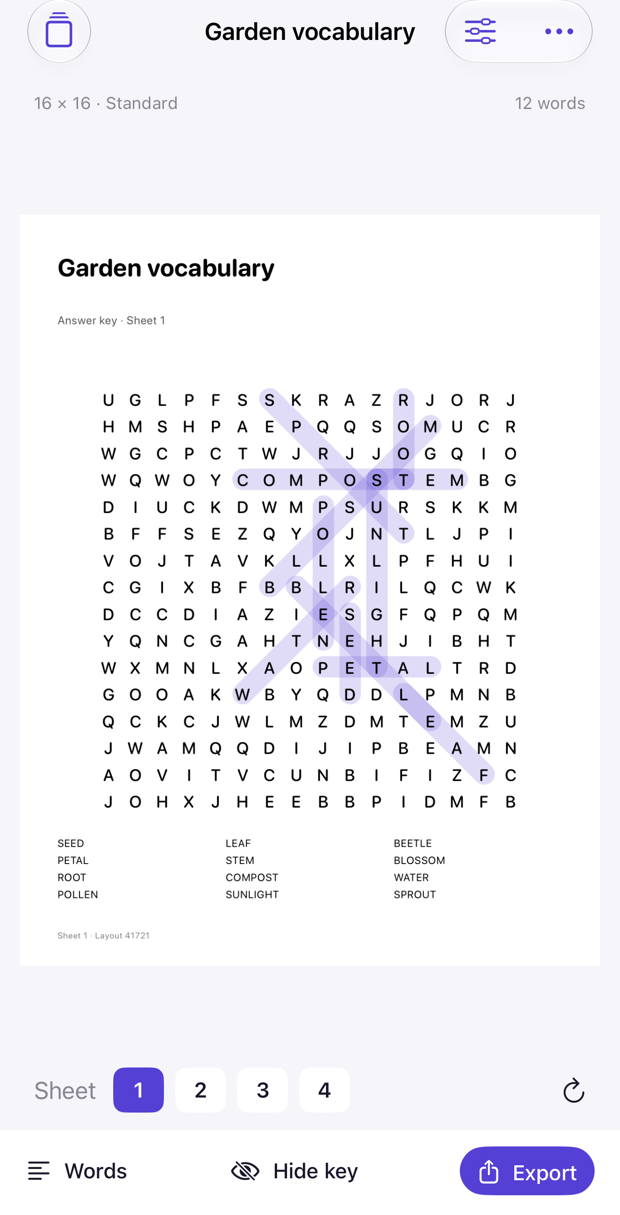
A complete print package
Preview the actual Worksheets.pdf and AnswerKeys.pdf. Use native sharing for either PDF, or share a ZIP with both PDFs, one grid-only SVG per sheet, Words.txt, a placements CSV, Project.json and Readme. PDF letters are selectable text. CSV coordinates are 1-based. The project record documents settings and cells; it is not an in-app restore format. Words.txt can be imported again.
Designed around the page
iPad places the word list next to a large paper preview and supports landscape. Choose 10–24 letters per side and Gentle, Standard or Challenge direction levels. Keep up to 20 local sets and 10 named print setups per set. Generate new layouts when you want another set.
Know the limits
2–40 words per set. Latin A–Z grid letters only. Accents are folded; spaces, apostrophes and hyphens are removed in the grid. Digits and other scripts are not supported. Normalized words must be unique and contain 2 letters to the selected grid size. Text imports are limited to 64 KB. Titles use up to 44 characters and instructions up to 160. Long labels may be shortened visually; the source list retains the entered text.
Every requested word must fit before a generated set is saved. Dense lists may need a larger grid or fewer words. Random filler can form unintended extra words. There is no profanity filter or guarantee that a word occurs only once. Review every worksheet before distributing. There is no built-in puzzle catalog, AI word suggestion, online play or publishing-platform acceptance guarantee. SVG appearance depends on receiving apps and fonts.
Support
Email maga40@naver.com with the app version, grid size and steps. Do not send private vocabulary or student information unless you intend to share it.
If generation fails, enlarge the grid or reduce the list. Check duplicate normalized words and unsupported characters. Export needs at least 40 MB of free device storage. To remove a set and its local exports, use Delete set in the More menu or delete from Saved sets. Shared copies remain in their destinations.
Privacy policy
Effective October 2, 2026. Gobling Company does not collect data through Lettrow. The app has no developer-operated server, network code, advertising, analytics SDK, tracking, account or in-app purchases. Generation and file processing take place on your device.
Titles, instructions, word lists, print setups, generated grids and export counts remain in the app’s local storage. You select specific text files using the system Files picker. No broad file access is requested.
Exporting and sharing is your choice. PDFs and ZIP packages contain your title, vocabulary, settings and placements. Review these contents before sharing. Native sharing and device backups follow the destination service and your device settings; Gobling Company does not receive these files automatically.
Deleting a saved set removes its local record and exports. Uninstalling removes the local app data. Copies you shared or backed up are managed in those destinations. Support email is handled when you contact us and is separate from app data collection. Contact maga40@naver.com for privacy requests.