 Maprelay
NUMERIC PNG TOOLS · iPhone & iPad
What changed
in your channels?
Build an expected texture from your saved mapping. Compare your candidate PNG, then inspect the exact bytes that differ.
For artists preparing packed numeric texture masks. One US $3.99 upfront purchase includes all features; regional prices vary. Updated submission in progress.
- Pack
- Route R, G, B and A from source components or constant bytes. Use explicit inversion and optional nearest resampling.
- Compare
- Check every decoded RGBA byte. Read complete channel statistics and binary masks, including RGB beneath alpha zero.
- Inspect & export
- Choose any pixel coordinate. Share the unchanged candidate, expected PNG, five masks, CSVs, settings-and-hashes JSON, PDF, readme and ZIP.
Local files. No account, subscription, IAP, advertising, analytics or developer upload.
Find differences
you can reproduce.
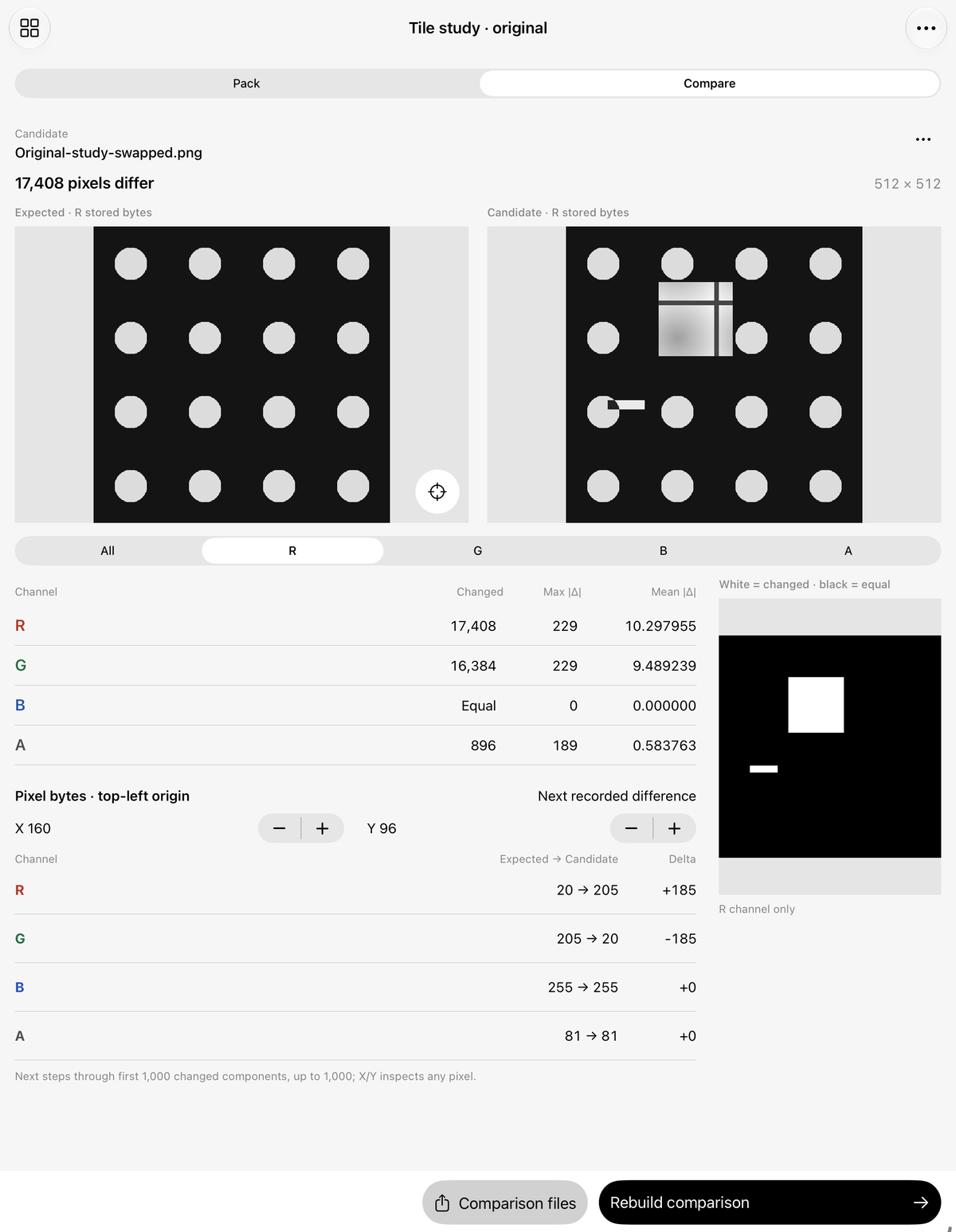
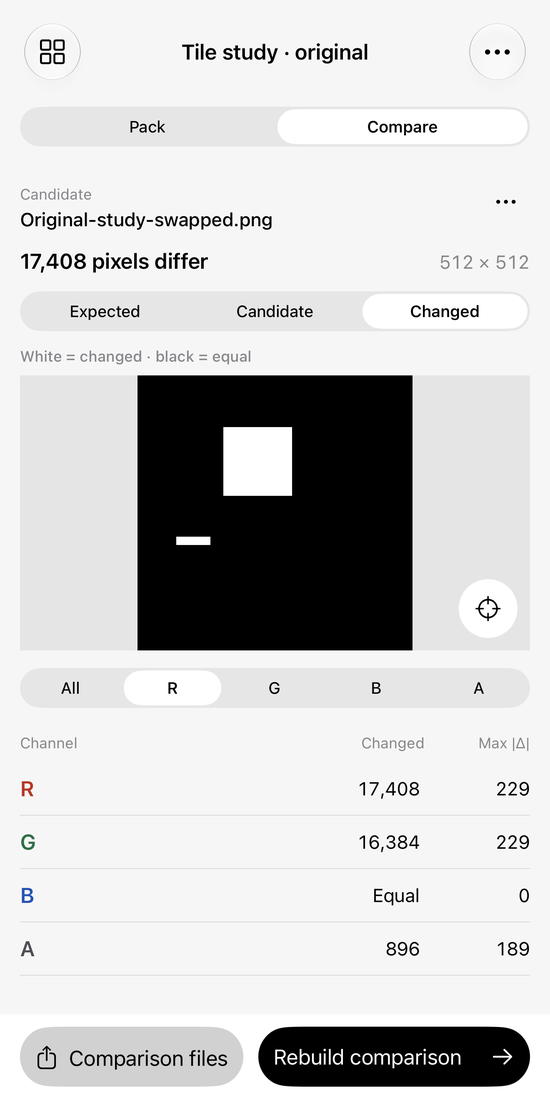
Import a candidate through native Files with exactly matching dimensions. Default isolated channels show grayscale stored bytes. All RGB previews ignore alpha. Expected, Candidate and Changed views share the same mapping.
Each channel reports changed pixels, maximum absolute delta and mean absolute delta over every pixel. White masks mean changed; black means equal. The X/Y inspector reaches any coordinate. Next recorded difference steps through at most the first 1,000 changed channel components in row-major/RGBA order.
Keep the input.
Share the check.
Keep up to 12 local packs, 8 source originals and one candidate per pack, and 8 named mapping presets. Originals carry SHA256 checks. Rename, duplicate, add notes, close and reopen. Mapping changes clear prior outputs before rebuilding.
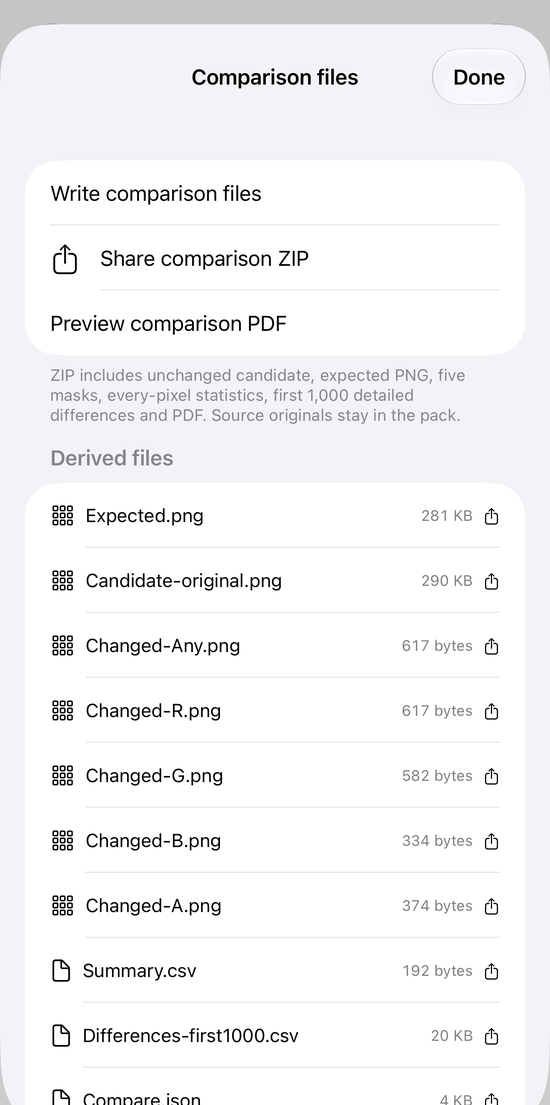
Comparison creates 13 files: Expected.png, unchanged Candidate-original.png, five Changed masks, full Summary.csv, Differences-first1000.csv, Compare.json, paginated PDF, readme and ZIP. The detailed CSV is capped; image counts and masks are complete. Source originals remain separately shareable and are not in the comparison ZIP.
Separate packing output creates 10 files with the RGBA PNG and four grayscale channel PNGs. Recipe and comparison JSON document the settings; they are not importable backups.
Numeric boundaries
Supported: static non-interlaced 8-bit gray, RGB, gray-alpha and RGBA PNG. Up to 2048 pixels per side and 32 MB per file. Palette, low-bit/16-bit, tRNS, APNG and other formats are unsupported. Stored bytes are used without gamma or ICC conversion, and profile/descriptive chunks are not preserved. Output is unassociated RGBA8. Candidate files are never resampled.
Equal decoded bytes do not establish equal metadata, correct material semantics or game-engine compatibility. Maprelay does not render 3D materials, bake maps, create atlases or integrate with a game engine. Inspect preset routes and destination import settings yourself. Keep important originals and shared exports outside the app.
Support
Email maga40@naver.com with “Maprelay”, app version, device and the step that failed. A small non-sensitive owned PNG example is optional. Do not send confidential assets.
How do I compare my own PNG?
Create a pack, import Sources through Files and inspect each Pack route. Switch to Compare and import a candidate of identical dimensions. Candidate actions replaces, removes or shares its unchanged original. Rebuild recomputes from verified originals. Comparison files → Write comparison files → Share comparison ZIP or Preview comparison PDF.
Why is an apparently transparent pixel different?
Unassociated PNG can store nonzero RGB with zero alpha. Maprelay compares those stored RGB bytes too. Isolated R/G/B/A and the coordinate inspector reveal them; All RGB preview explicitly ignores alpha.
Why was my file rejected?
Check the supported PNG formats and dimensions above. A checksum error rejects a damaged PNG. Candidate dimensions must exactly match the pack; no automatic candidate resizing occurs. Failed import retains your existing candidate and results.
Privacy policy
Effective October 9, 2026. Gobling Company does not collect data through Maprelay. The app has no advertising, tracking, analytics, account, third-party runtime SDK or developer network service.
PNG files you explicitly select, retained source and candidate originals, hashes, mappings, presets, names and notes stay in app-local storage. PNG, CSV, JSON, PDF, readme and ZIP exports are generated locally. Native sharing sends selected files to destinations you choose, which have their own terms. Review files before sharing. We receive none of these operations.
Deleting a pack removes its local inputs, settings and associated outputs. Uninstalling removes app-local data. Exported copies remain at their destinations and must be removed there. Device backups follow your system settings.
If you email support, voluntarily supplied correspondence is used to answer your request. This website and email providers are separate from the offline app and may process ordinary request information. Contact the support address for privacy questions or deletion of support correspondence.
Terms of use
Only import and share assets you are permitted to use. You retain rights to your files. Check exact mappings and destination import settings before using derived files in a project. Maprelay provides the supported local numeric workflow above; it does not certify material correctness or engine compatibility. Apple’s standard license and purchase/refund terms apply. Gobling Company owns Maprelay, its original synthetic studies and artwork. Contact support for defects.